Blog
v3.8.2
Here we go again, MediLog v3.8.2 is available as of now. A few smaller new features and a bunch of bugs fixed which crept in with the recent big release.
Read more →v3.8.1
MediLog v3.8.1 is available as of now.
A new release a week after v3.8.0, not really unexpected given the significant nature of v3.8.0.
Fortunately there weren’t any big issues but a decent number of small annoiances which this release should address.
As usual a few new features slipt in as well, tags are now available for all tabs and I am seeding a few common tags so people get an idea how tags may be used.
Read more →v3.8.0
MediLog v3.8.0 is available as of now.
This release turned out to be a lot bigger than anticipated. Got rid of a big lot of antiquated code. MediLog is in it’s 8 year now and so were parts of it’s codebase. Anyway, along the way of lot’s of refactoring quite a few new features were added in.
Some of the more interesting ones are…
- Backup: Added machine-readable metadata to backup files explaining the content of the backup
- Tags: “exclusive tag” option enabling single choice tags
- Glucose:Moved tags from 3 fixed tags to the unlimited tags used in other tabs
- Charts: Show date of record when selecting a position in a chart
- Charts: Added possibility to directly navigate to record from a chart
Analyse Health Trends
I know it’s quite controversial, but maybe here’s something useful AI can do for us and possibly do well:
Analyse MediLog health data, look for significant trends, correlations, and patterns accross all tabs of MediLog.
For this use case MediLog has added machine-readable metadata to each backup as of release v3.7.3. This means all one needs to do is to drag&drop a MediLog backup file on an AI window and provide a meaningful prompt.
 Read more →
v3.7.2
MediLog v3.7.2 is available as of now.
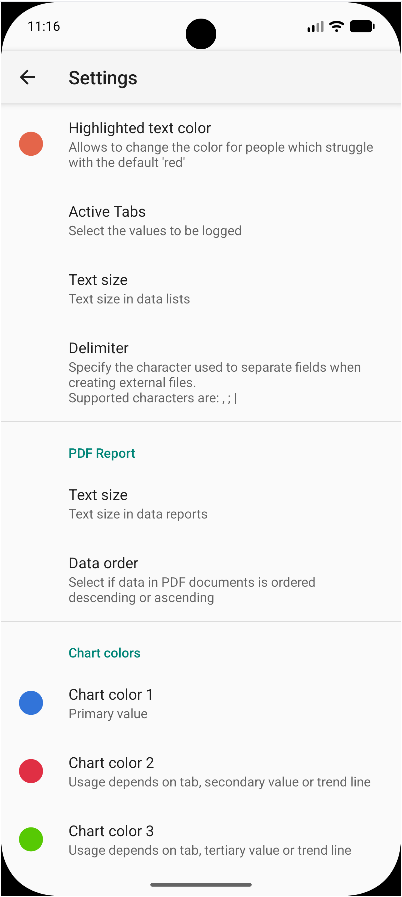
Main new feature is user defined chart colours. A feature I have been asked for a lot because apparently it’s impossible to get colours right for everyone :-) Other than that a few smaller bug fixes which you can lookup in the changelog.
Read more →Custom colours
People have been all over me for the colours in the charts ever since I made them a little more prominent. Somehow I never managed to get the colours right for everyone.
So finally here’s the solution to end this conversations for good.
Custom Colors for the 3 colors I use in charts. Pick and chose to your hearts delight.
 Read more →
v3.7.1
Had to push a quick bugfix release as introducing the new Default Tab functionality unveiled a variable with the wrong type which, for some users, prevented the app from starting.
That variable has been around for a while but was silently converted automatically, until now :-/
Added a more resiliant and self-correcting way to handle such situations.
Read more →Google Developer Registration
FDroid is a lot quicker these days, MediLog v3.7.0 is already available and with that I am able to test if this build passes the upcoming Google Developer verification…and it does. Both flavours sucessfully registered!
Read more →v3.7.0
All tests passed -> ready to release MediLog v3.7.0
Quite a few new features such as …
- Added printing support. No more need for 3rd party pdf viewers
- BloodPressure, Oximetry: Added secondary Y-axis for pulse
- Fluid: Added quick-quantity feature to allow for quicker enty of often used quantities
- Refreshed Tab selector, now allows reordering of tabs and setting a default tab
…as well as many more smaller things
Read more →Updated filter icons
Getting some feedback that the current filter on/off icon is easy to miss, which I agree to, has hit me already as well. Hence here’s a modified design which changes the icon more visibly and also adds a counter to reflect how many filters are active. (time+tag+comment)
Let me know what you think.
Filter active

Filter off
